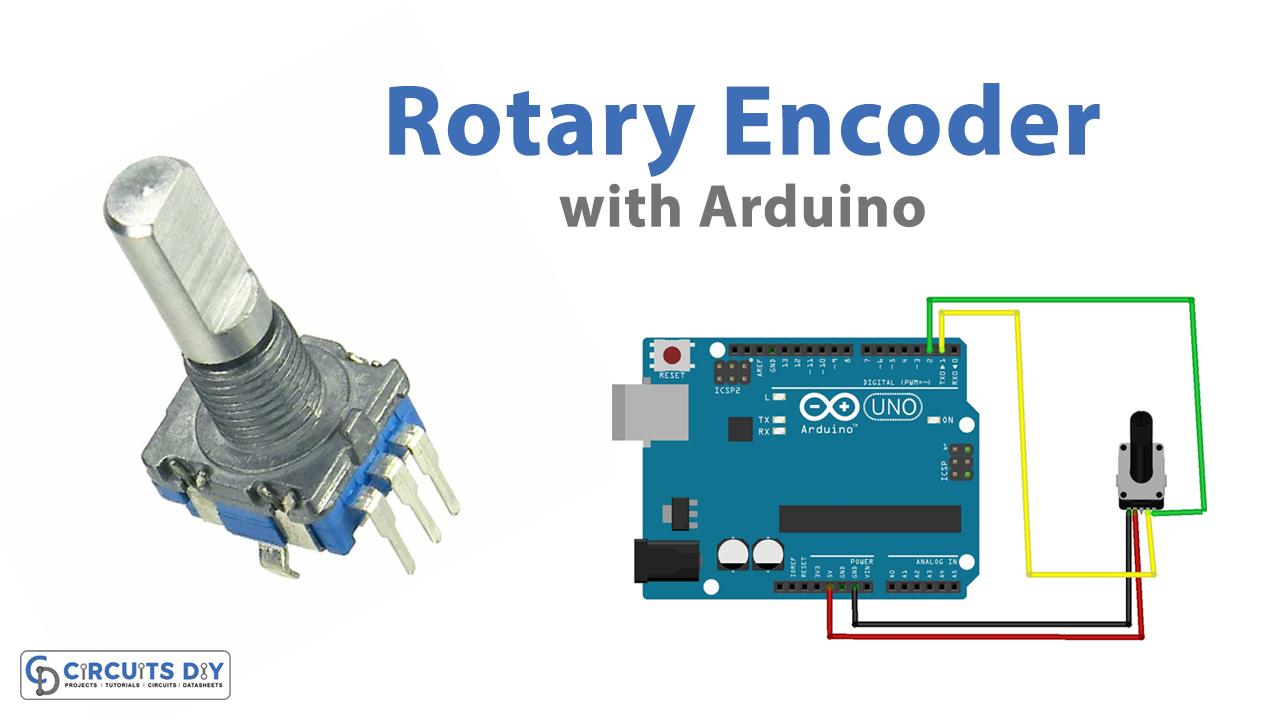
In a permanent magnet, brushless motor, a sensor or device known as a rotary encoder is utilized to detect the angle of the motor shaft. The question might come to your mind how this sensor works? The sensor generates an electrical signal when detecting any rational movement. And, thus, this helps to control the position or speed of any device. But, these types of sensors require a controller that drives them. For example, an Arduino. So, to understand how Arduino can drive the encoder, in this tutorial, we are going to Make an ” Arduino Rotary Encoder Interface “
 #define encoderOutA 2 // CLK pin of Rotary Enocoder
 #define encoderOutB 1 // DT pin of Rotary Enocoder

 int counter = 0;
 int presentState;
 int previousState;
 void setup() {
   pinMode (encoderOutA,INPUT);
   pinMode (encoderOutB,INPUT);

   Serial.begin (9600);
      previousState = digitalRead(encoderOutA);   // Get current state of the encoderOutA
 }
 void loop() {
   presentState = digitalRead(encoderOutA);
      if (presentState != previousState)
      {
          if (digitalRead(encoderOutB) != presentState)
          {
       counter ++;
     }
     else {
       counter --;
     }
     Serial.print("Position: ");
     Serial.println(counter);
   }
   previousState = presentState; // Replace previous state of the encoderOutA with the current state
 }
Code Explanation
First, define the Arduino pins connected with the encoder pins. Then define the variables counters (initialize the count as 0), presentState, previousState to store the integer values.
In void setup, declare
Application and Uses
It’s suitable for usage in door control systems.
It can also be used in robotics.
An encoder is incorporated into several testing devices.
Encoders are used in parts assembling machines.
Encoders are used in drilling machines, mixing machines, and other devices.


 How to Interface LM335 Temperature Sensor with Arduino UNO
 How to generate Super Mario Theme Song by using Arduino Microcontroller
 Potentiometer Triggers Piezo Buzzer - Arduino Tutorial
 Interfacing 315/433 MHz RF Transmitter-Receiver with Arduino
 HTTP Request - Arduino Tutorial
 Control Stepper Motor with L298N Motor Driver & Arduino